
Job Application Checklist: 12 Things to Check Before Submit
A job application checklist exists because the last five minutes before you press submit are where good applications go wrong. The resume is tailored, the cover letter is written, and then the wrong file is attached, the phone number has a typo, or a knockout question is answered in a hurry. This job application checklist has twelve checks, grouped in the order you meet them: the files, the resume content, the form, and the record you keep afterwards. Run it every time. It takes ten minutes and it is the cheapest insurance in the search.
TL;DR: Before you submit, check the file (right version, PDF unless asked, sensible name), the contact details, the keyword match against the posting, dates consistent with your online profile, the cover letter's addressee and role, every form field against the resume, the knockout questions, and that you have saved the posting text and recorded which version you sent.
The files: checks 1 to 3
1. The right version is attached
Open the file you are about to upload and read the first three lines. The headline should name this posting's title and the summary should use its words. It is easy to attach last week's tailored copy, and the recruiter will notice a resume aimed at a different job. If you keep a base version per role family, confirm you are sending the tailored copy, not the base.
2. The right format
Send a PDF unless the posting or the portal asks for Word. A PDF preserves layout; a Word file is easier for some agencies to edit. Never send an image-based PDF, such as a scan, because the parser cannot read it. Open the PDF you exported and select the text with your cursor to confirm it is real text.
3. A sensible file name
Portals often show the file name to the recruiter. "resume_final_v3 (2).pdf" reads as careless. Use "Firstname_Lastname_Resume.pdf" or "Firstname_Lastname_Resume_JobTitle.pdf". Keep your own detailed version name in your records, not on the file you upload.
The resume content: checks 4 to 7
4. Contact details are correct and current
Read the phone number digit by digit. Check the email address for typos and make sure it is one you check daily. Confirm the city and province match where you are applying from, and that any link to a profile or portfolio opens. A fictional candidate, Nadia Karimi, lost a screen call because her resume carried the number of a phone she had replaced; the recruiter left one message and moved on.
5. The keywords match the posting
Put the posting and the resume side by side. The two or three phrases the posting repeats should appear, in the same words, in your summary and at least one bullet. The must-have skills should each be visible somewhere. Our guide on reading a job description like a recruiter explains how to find those phrases.
6. Dates and titles match your online profile
Recruiters open your public profile in another tab. If the resume says a role ran 2021 to 2023 and the profile says 2021 to 2022, or the titles differ, trust drops before anyone has read a bullet. Check every role's dates and title against the profile, and fix whichever one is wrong.
7. The resume parses cleanly
Paste the whole resume into a plain text editor. Headings should stand on their own lines in order, every bullet should be on its own line, and nothing from a header, footer, table or text box should be missing. If the plain text is scrambled, the portal's parser will be too.
The form: checks 8 to 11
8. The cover letter is addressed correctly
If there is a cover letter, read its first paragraph. The role title, the company name and, if used, the person's name must be this application's. A letter that opens with the wrong company name is the most common and most damaging copy-paste error. Check the file name of the letter as carefully as the resume's.
9. Every form field agrees with the resume
Portals ask you to type your work history into fields even after you upload a resume. Those fields feed the database the recruiter searches, so they must match the file: same titles, same dates, same employers. Where autofill has filled a field, read it. Phone formats, date formats and duplicated address lines are the usual errors.
10. The knockout questions are answered honestly and carefully
Questions about work authorization, required licences, availability, willingness to relocate and minimum qualifications are screened automatically. A wrong "no" removes you; a wrong "yes" is discovered later. Read each one twice. If a question has a free-text box, use it to add one line of context where the yes-or-no answer is incomplete.
11. Optional fields are used, or deliberately left blank
Fields for a portfolio link, a referral name, salary expectations or additional information are optional, but a referral name in particular changes how an application is routed. Fill what helps you and leave the rest empty rather than typing "N/A" in every box.
The record: check 12
12. You have saved the posting and recorded what you sent
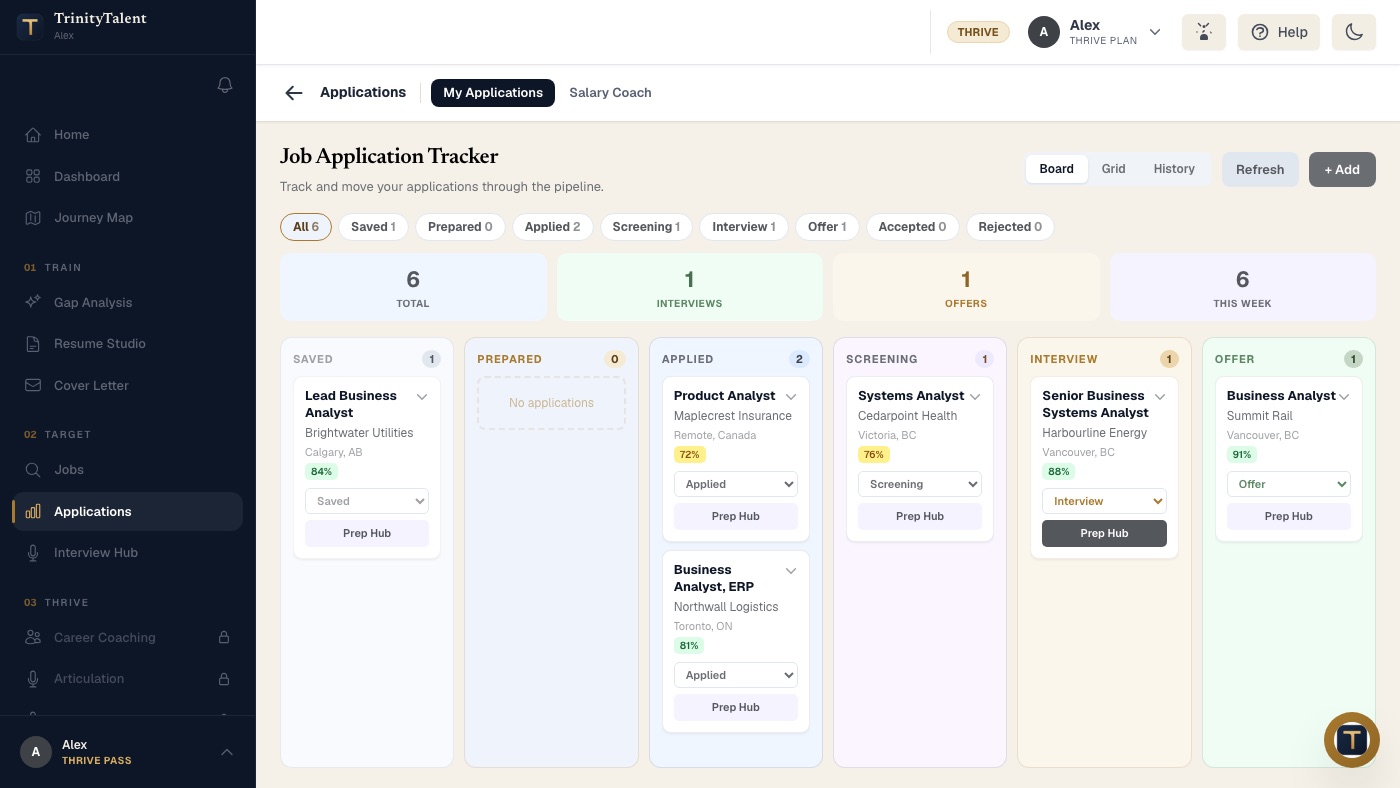
Postings are taken down when roles fill. Before you submit, save the full posting text, note the date and the version of the resume you attached, and add the application to your tracker at the Applied stage. When the screen call comes in three weeks, you will have the exact words you were matched against and the exact page the recruiter is holding.
Mistakes the checklist catches most often
- The previous employer's name in the cover letter.
- A base resume sent instead of the tailored copy.
- A phone number with two digits transposed.
- Dates on the resume that differ from the online profile by a year.
- A knockout question answered "no" by reflex when the honest answer was "yes".
- An image PDF that no parser can read.
- No saved copy of the posting, so the interview preparation starts from memory.
None of these is a skill problem. All of them are five-minute problems that the checklist exists to prevent.
How TrinityTalent helps
TrinityTalent's free resume builder runs a rules-based Check on your device before you export, flagging missing contact details, inconsistent date formats, headings a parser will not recognize and bullets that read as paragraphs, with a one-click fix for each. Word and PDF export produce real text, never an image. The Match tab compares your resume against the actual posting so the keyword check is done for you, and one-shot tailoring rewrites from your own facts when the match is weak.
The Application tracker records check 12 automatically: each card stores the posting text and the resume version you sent as it moves from Saved to Applied and beyond. The Chrome extension can fill application forms on Workday, Greenhouse, Lever, iCIMS and Taleo, and you review every field and press submit yourself. Everything described here is free while the product is in beta.
Frequently asked questions
What should I check before submitting a job application?
Twelve things: the right resume version, the right file format, a sensible file name, correct contact details, keywords matched to the posting, dates consistent with your online profile, clean parsing, the cover letter's addressee, form fields that agree with the resume, honest knockout answers, optional fields used deliberately, and a saved copy of the posting with the version you sent.
What is the most common job application mistake?
Copy-paste errors: the wrong company name in a cover letter, the previous posting's title in the summary, or last week's tailored resume attached to this week's application. They are caught by reading the first three lines of every file you attach, which takes under a minute and should never be skipped.
Should I send my resume as a PDF or a Word file?
PDF by default, because it preserves layout and is accepted by most portals. Send a Word file when the posting or the portal asks for one, or when applying through an agency that edits resumes. Never send a scanned or image-based PDF, because applicant tracking systems cannot read the text in it.
Why should I save the job posting before I apply?
Employers take postings down once the role is filled, sometimes within days. The saved text is your only record of the requirements you were matched against, and it is what you prepare from when the interview is scheduled weeks later. Save it with the date and the resume version you sent.
Put this into practice
Run the free Check on the resume you are about to send, then save the posting text and the version in the tracker before you press submit.
Check your resume free