
Resume PDF or Word? Which File Format to Send and When
Resume PDF or Word is a question with a short answer: send a text-based PDF when the portal accepts it, send a Word file (.docx) when the posting asks for one or you are applying through a recruitment agency, and never send an image. The resume PDF or Word choice matters less than it did ten years ago, because modern parsers read both, but the wrong choice in the wrong place still costs applications. This guide gives the rule, the exceptions, the image trap, file naming, and what a good Word export has to preserve.
TL;DR: Default to a text-based PDF: it looks the same everywhere and parses on modern systems. Send .docx when the posting says so, when applying through an agency that reformats resumes, or when the portal rejects PDF. Never send a scanned or image PDF. Name the file Firstname-Lastname-Resume. Keep both versions from the same source.
PDF by default: why
A PDF is a fixed picture of your page. The fonts, spacing and page breaks you see are what the recruiter sees, on any device, in any software. A Word file is a set of instructions that each version of Word, and every other word processor, interprets slightly differently; a resume that fits one page on your laptop can spill to two on theirs, with a heading orphaned at the bottom.
Modern applicant tracking systems parse a text-based PDF as easily as a Word file. The old advice to avoid PDF dates from a time when that was not true. Today, if the upload box accepts PDF, send PDF.
Two conditions. The PDF must be text-based, exported from the document rather than scanned or screenshotted. And the resume inside it must be single-column with standard headings, because a PDF fixes the layout but does not fix the reading order; a two-column resume parses badly in either format. The resume parsing errors guide covers layout.
When to send a Word file instead
- The posting asks for it. "Submit your resume in Word format" is an instruction, and ignoring instructions is the first filter.
- The portal rejects PDF. Some older systems accept only .doc or .docx. Do not convert your PDF back into Word with a converter; export from the original.
- A recruitment agency is submitting you. Agencies often remove your contact details, add their letterhead and reformat before sending to the client. They need an editable file.
- A hiring manager asks by email. They may want to add notes or share it in a document system.
- The employer requests edits. Occasionally a company will ask for a version with a particular section added; editable is easier.
Use .docx, not the older .doc, unless the portal states otherwise. And keep the Word version as clean as the PDF: no text boxes, no tables, no tracked changes left switched on.
The image PDF trap
An image PDF looks identical to a text PDF and contains no readable text. It happens when a resume is scanned, when a design tool exports text as shapes, when someone photographs a printout, or when a "print to PDF" step turns the page into a picture. The parser opens it and finds nothing. Your profile is empty and the recruiter sees blank fields.
Test every PDF before you send it: open it and try to select a line of text with the cursor. If the words highlight, it is text. If a rectangle appears or nothing happens, it is an image. Re-export from the original document.
What a portal does with each format
The upload step on a careers site extracts text from your file, fills the application fields from it and stores the original for the recruiter. With a text PDF and a Word file of the same single-column resume, the extracted text is the same; the parsed profile is the same; the recruiter sees the same fields.
The difference appears when the recruiter opens the original. The PDF looks exactly as you designed it. The Word file opens in whatever they use, with their default fonts substituted for any you chose that they do not have, and page breaks recalculated. Neither is a disaster, but the PDF is predictable.
One more case: some portals ask you to upload the file and then type your history into form fields anyway. Type it consistently with the file; the Canadian resume format guide covers the date and title conventions those forms expect.
File naming and versions
The file name is the first thing the recruiter reads after your application arrives, and "resume (3).pdf" is a poor first line. Use your name, the word resume, and optionally the role.
- Priya-Sharma-Resume.pdf
- Priya-Sharma-Resume-Payroll-Specialist.pdf
Hyphens rather than spaces avoid problems in email links and some portals. No version numbers, no dates, no "final". Keep versions in your own folder or in a builder that snapshots them, not in the file name the employer sees.
Keep the PDF and the Word file from the same source document, exported at the same time. A common error is editing the Word file after the PDF was made and sending both to different employers with different content.
What a good Word export must keep
Producing a Word file from a designed resume is harder than producing a PDF, and many tools do it badly. There are two failures to check for.
Lost styles. Headings become body text, rules under headings vanish, bullets become dashes or asterisks. The resume still parses, but it looks unfinished to the person who opens it.
Fused text. Word does not support the flexible layouts that web-based builders use for the line that holds a title on the left and a date on the right. A naive export runs them together, "Project Coordinator2021 - Present", with no space. This is both ugly and a parsing problem, because the title and the date are now one token.
A good exporter translates the layout into Word's own structure, keeps the heading styles, and separates every title from its date. Open the exported file and read the first role: if the date is glued to the title, do not send that file.
A decision checklist
- Does the posting name a format? Use it.
- Does the portal accept PDF? Send a text-based PDF.
- Is an agency or a person going to edit it? Send .docx as well.
- Did you test the PDF by selecting text? If not, do it now.
- Is the file named Firstname-Lastname-Resume? Rename it.
- Are the PDF and the Word file from the same version? Check the date on both.
How TrinityTalent helps
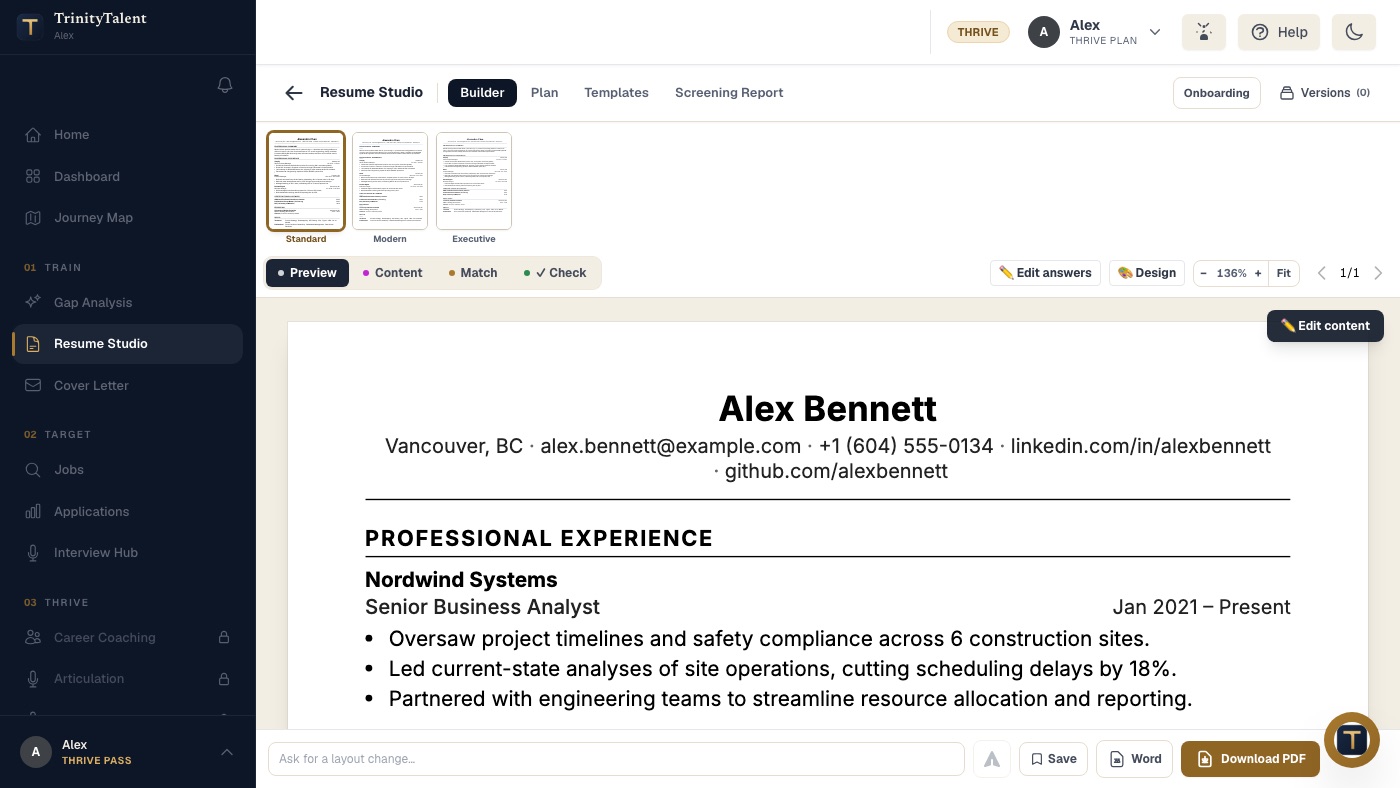
TrinityTalent's free resume builder exports the same resume as a text-based PDF or a Word file from a single source, so the two never drift apart and the choice is made per application, not per rewrite. Every template is single-column and ATS-safe, which means the reading order is correct in either format; the PDF is generated from the document text, never from an image.
The Word export is built for the two failures above. It translates the template into Word's own styles, keeps headings and rules, and keeps every job title separated from its dates, so nothing arrives fused. You choose the format the posting asks for at export time. Building, editing and exporting your resume on TrinityTalent is free.
Frequently asked questions
Is it better to send a resume as a PDF or a Word document?
A text-based PDF by default. It looks identical on every device and modern applicant tracking systems parse it well. Send a Word file (.docx) when the posting asks for one, the portal rejects PDF, or a recruitment agency needs an editable copy to reformat before submitting you.
Can an ATS read a PDF resume?
Yes, if the PDF contains real text and the layout is single-column. Test by opening the file and trying to select a line; if the words highlight, it is text. A scanned or image PDF contains nothing a parser can read and produces an empty profile.
What should I name my resume file?
Your first name, last name and the word resume, joined with hyphens: Priya-Sharma-Resume.pdf. Add the role if you like. No version numbers, dates or "final"; keep those in your own folder. The file name is the first thing the recruiter reads.
Should I send both a PDF and a Word version?
Only if the employer or agency asks. Send one file in the format requested, and keep the other ready. Make sure both are exported from the same version of the resume at the same time, so the content never differs between them.
Put this into practice
Build once in the free builder and export the same resume as a text-based PDF or a styled Word file, whichever the posting asks for.
Pick an ATS-safe template